
Important Notes
- Features marked with a star (*) have to be activated by ITONICS. For more information, please contact your Account- or Customer Success Manager.
- Please make sure to clear your browser cache once the update was processed, in order to avoid cache conflicts.
Take a look at the product update article to see the release highlights at a glance.
API
API
- NUC-16638 – Rating data and social interaction data (followers and likes) can now be retrieved via dedicated API endpoints. Previously returned as part of every standard element response, this data has been separated out to prevent performance issues on elements with high volumes of ratings or engagement. The new endpoints support filtering and pagination, making them more suitable for integration and reporting use cases.
- NUC-17207 – A new optional RBAC-enforced API mode (opt-in) has been implemented which can be enabled to evaluate the application-level permissions of the requesting user for every API request – contrary to the legacy API permission mode (current default) which is controlled via dedicated API-level permissions.
- NUC-17972 – A new PUT API endpoint for Roadmap data has been introduced, enabling automated external systems (e.g., SAP, PPM tools) to push updates directly into ITONICS roadmaps. The endpoint supports updating existing roadmap records, adding new elements to existing roadmaps, updating milestone data, and creating or removing connections including connection type and direction.
- NUC-19181 – The API now supports the OAuth2 Authorization Code Grant flow as a new authentication option. This enables integrations to authenticate users through their existing identity provider, eliminating the need for separate API credentials for users who access ITONICS via SSO. Existing authentication methods are unaffected.
Campaigns
Permissions
- NUC-13724 - The “Inherit submission-level permission” has been extended to cover export actions, ensuring Campaign Managers can export submission data without requiring a separate, manually configured role permission.
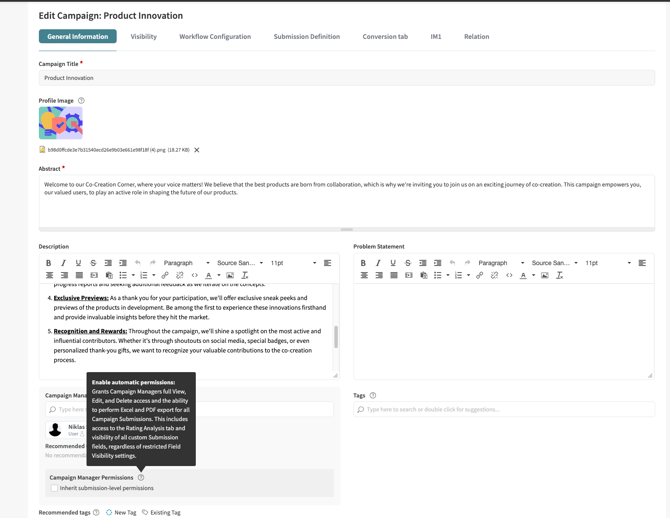
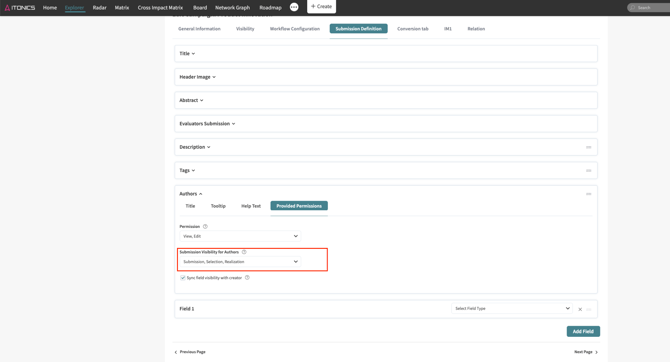
- NUC-18275 – The Campaign permission model for Authors and Campaign Managers has been significantly improved by introducing an option to detach the submission permission of Authors from being tied to the original creator. Campaign Managers with the "Inherit submission-level permissions" option enabled now automatically receive full visibility of all custom submission fields, regardless of phase-specific visibility restrictions for their user role. A new "Sync field visibility with creator" option in the Authors field configuration ensures that Authors can see the same submission fields as the original Creator, including a fallback for external submitter scenarios where no Creator role exists. New submission fields now have all phases enabled in their Phase Visibility settings by default, reducing the likelihood of unintentional field access gaps.
Core
Entity Configuration
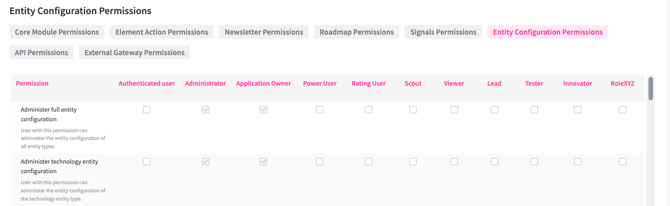
- NUC-17083 – Administrators can now apply Entity Configuration permissions at the entity type level, enabling a more decentralized and scalable approach to managing platform configuration. This update is fully backward-compatible — existing setups are unaffected until explicitly reconfigured.
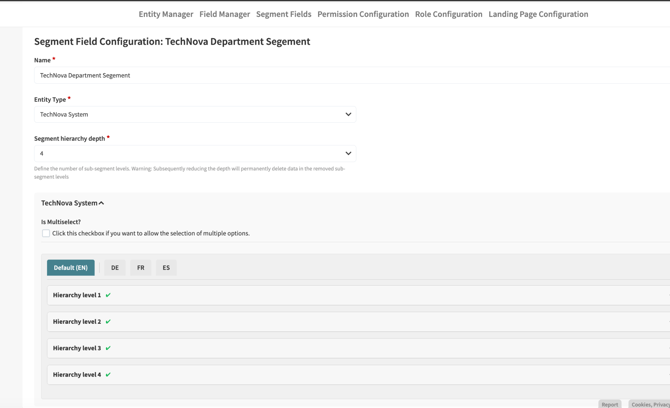
- NUC-17928 – The Segment Field Configuration experience has been redesigned to significantly reduce the time and effort required to set up and manage segment hierarchies (before vs. after). Configuration is now unified in a single location under Entity Configuration > Segment Fields, eliminating the need to navigate between separate menus. Segment options are managed through a new split-panel modal with an interactive tree view on the left and an edit form on the right, supporting bulk actions, drag-and-drop reordering within groups, real-time search, and language tab-based translation management — all without requiring page reloads.
Permissions
- NUC-13723 – Excel and PDF export permissions have been moved from the global permission level to the entity-type level, enabling more granular control over who can export data for each entity type. Roles that currently hold the global export permission will automatically retain the equivalent entity-level permissions for all existing entity types. A global administrative override remains available for roles that require export access across all entity types.
Rating Configuration
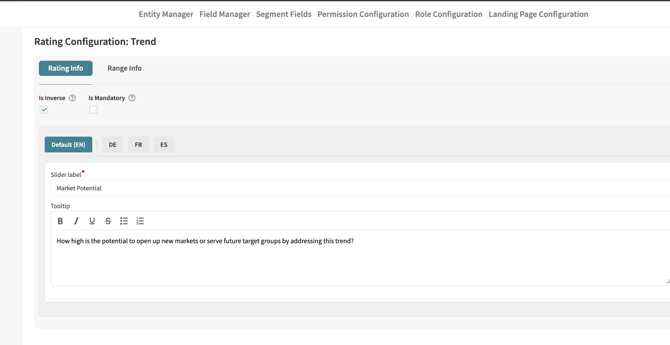
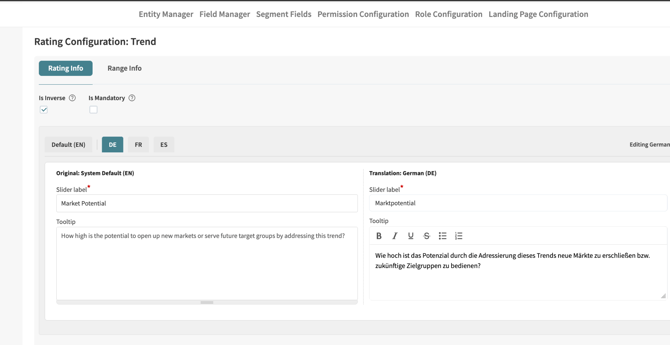
- NUC-17929 – The Rating Configuration modal has been redesigned to improve usability and reduce visual complexity. Language fields are now managed through a tab-based selector rather than being displayed simultaneously, significantly reducing scrolling. Individual rating range options are collapsed by default, with an at-a-glance completion indicator showing whether required fields for each range are filled per language. The updated design applies consistently across regular ratings, aggregate ratings, and campaign rating configurations.
Integration
Mintel & Kantar Integrations *
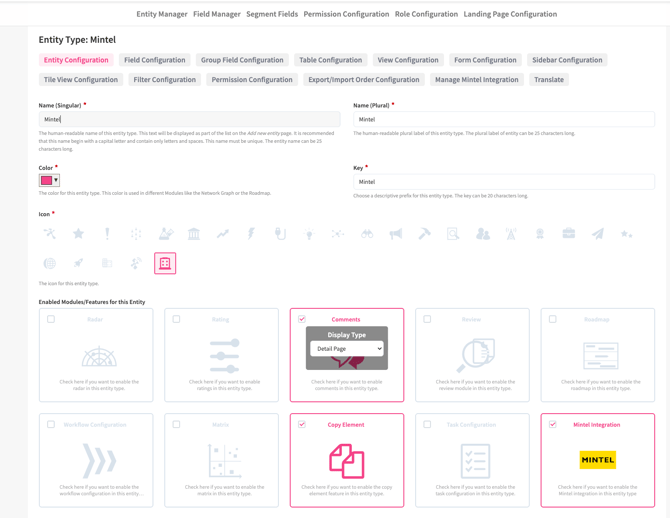
- NUC-18712 – The Integration Module has been extended to support Mintel and Kantar as new third-party data providers. Administrators can now configure connections to these providers alongside existing integrations, enabling automated data ingestion from Mintel and Kantar directly into the ITONICS platform.
Note: ITONICS does not provide a license for these tools — a valid subscription with the respective provider is required to use this integration.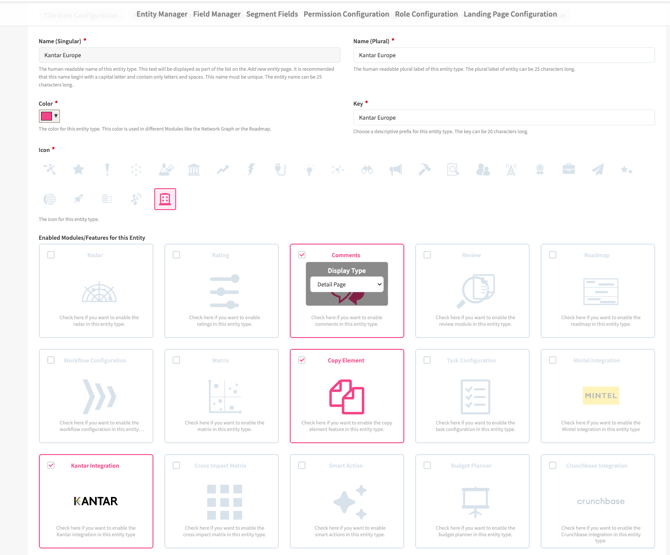
- NUC-18713 - Implemented a new Integration Credential Management page to allow for centralized managing of credentials of third-party integrations activated for your ITONICS system. Permitted administrators can add, update, and test integration credentials directly and independently — for example, replacing an expired API key without raising a support request.
Portfolio
Boards
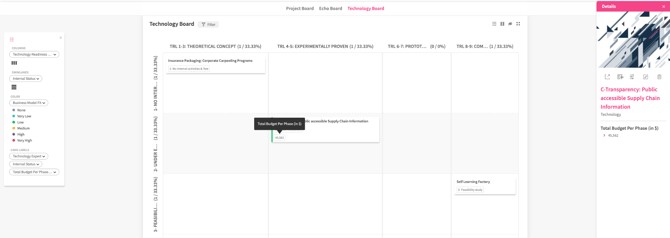
- NUC-15870 – Number fields, calculated fields, and date calculation fields can now be selected as dynamic card labels on the Board view. This allows users to display quantitative data such as NPV, scores, or calculated durations directly on Board cards, making it easier to assess and compare elements at a glance without opening individual detail pages.
Roadmap
Milestones
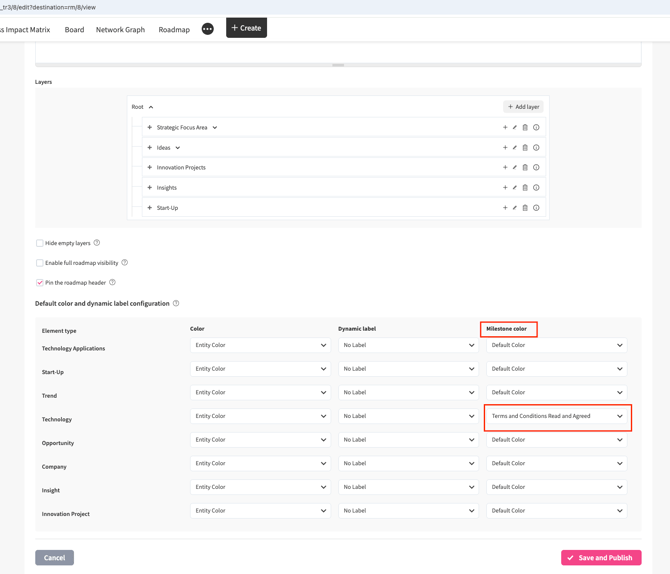
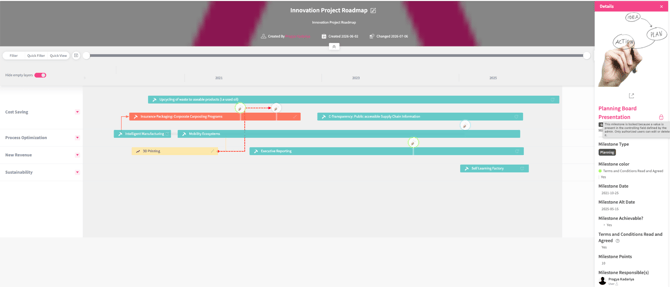
- NUC-18261 – Milestones on the roadmap visualization can now be colored based on the value of a configured list field (e.g., Approval Status), following the same logic as existing element bar coloring. Administrators can define a default coloring field per milestone type in the roadmap configuration, and users can adjust the active color dimension during a session directly from the roadmap legend. Changes made in the legend apply only to the current session and revert to the default on the next page load.
- NUC-18265 – A new Milestone Lock Mechanism has been introduced to protect finalized milestones from unintended modification. Administrators can designate any milestone field as a "Controlling Field"; once a value is saved in that field, the milestone becomes locked for users without the new "Lock/Unlock milestone on roadmap" permission. Locked milestones display a visual indicator on the roadmap visualization and in the milestone sidebar, and non-permitted users cannot edit, delete, or move them via drag-and-drop. Permitted users retain full edit rights. Lock and unlock events are recorded in the element timeline. The lock is also enforced for updates via Roadmap Excel import and the Roadmap PUT API endpoint.
Roadmap
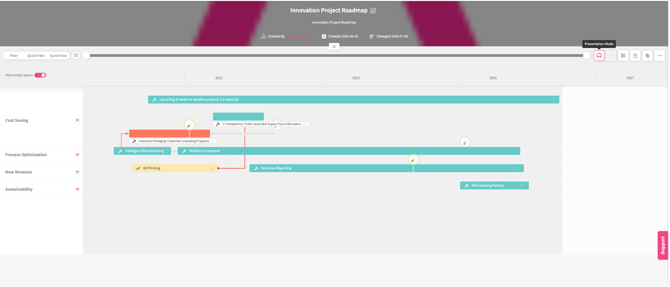
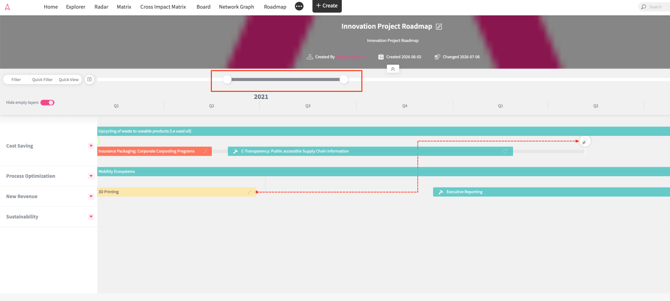
- NUC-18255 – A new Presentation Mode has been added to the roadmap toolbar, designed for management reporting and stakeholder communication scenarios where full label visibility is critical. In the standard roadmap view, element labels are constrained to the width of their bars, which can result in truncated titles and a dense layout that is practical for day-to-day planning but less suitable for reporting. Presentation Mode addresses this by expanding all element labels to their full text width and automatically distributing elements into separate swimlanes to ensure every title is fully readable at a glance. Standard editing interactions such as drag-and-drop and resizing are disabled in this mode to maintain performance. PNG exports of the roadmap automatically apply the Presentation Mode layout, ensuring exported images reflect the same uncluttered, fully labelled view.
- NUC-18263 - Element titles on the roadmap visualization are now sticky and responsive to the timeline view. When scrolling or adjusting the timeline filter causes an element's start date to move out of view, the title automatically repositions itself to remain anchored to the left edge of the visible portion of the element bar. This eliminates the need to scroll back to identify elements that extend beyond the current view. The behavior applies consistently across the roadmap visualization and Roadmap Snapshots.
SSO/SAML
SAML
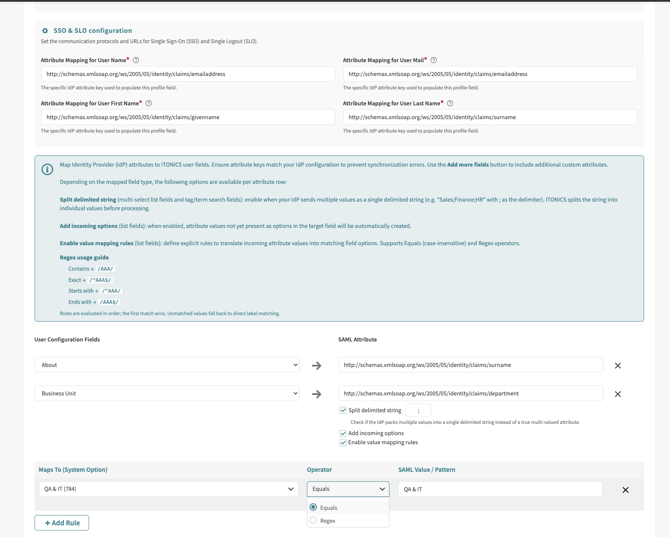
- NUC-18697 – The SAML field option mapping configuration has been enhanced with support for flexible, configurable value mapping between source and target option values. Administrators can now define exact, partial, and pattern-based (regex/wildcard) mapping rules, with a clear evaluation priority applied in that order. New target option values can be automatically created when a mapping target does not yet exist, if enabled. All mapping logic is externally configurable without requiring code changes, and existing behavior is fully preserved when no new configuration is provided.
Workflow
Notifications
- NUC-18080 – Workflow element notifications now support new tokens to reference the target element directly within notification message templates, allowing for more contextual and actionable notification content especially when an element is converted from one type to another.
Workflow Triggers
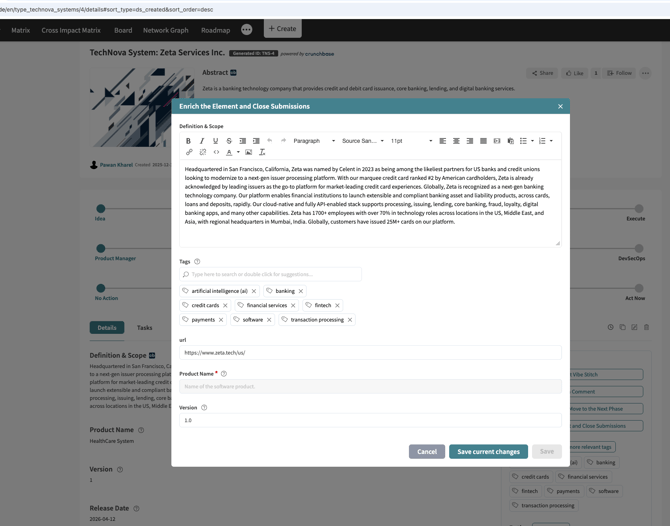
- NUC-15711 – Mandatory field validation for Enrichment workflow triggers is now applied consistently across all trigger combinations. When an Enrichment trigger is combined with other triggers such as Value Change, Notification, or Rating, the workflow step now presents two save options: "Save", which requires all mandatory fields to be completed and fires all associated triggers, and "Save current changes", which allows partial progress to be saved without executing secondary triggers. This prevents workflow actions — such as status changes or notifications — from being fired before the required data has been provided.
3.25.1 (Released on 22nd of July 2026)
API
- NUC-15974 - Timeline entries for elements and submissions created or updated through import now appear correctly in the single and all elements API responses.
- NUC-17080 - The API now blocks element-to-roadmap connections to match the interface behavior, returning a clear validation message when an invalid relation is submitted.
- NUC-17933 - The user field properties endpoint now returns all fields in a single response, removing unnecessary pagination that repeated the same results on every page.
- NUC-17977 - Creating or updating elements through the API now enforces the full segment hierarchy, so a child segment can no longer be set without its parent.
- NUC-18037 - Update requests through the API no longer raise false validation errors for mandatory User Group Search Fields that already hold a valid value.
- NUC-19118 - Fetching elements through the API for an entity type that has a file field but no elements no longer returns a query error.
- NUC-19374 - Workflow status change events now appear in the element timeline returned by the API, giving integrations a complete activity history.
Campaigns
- NUC-14389 - Help text for the evaluator, author and tag fields now behaves consistently, showing a proper editable placeholder rather than fixed text.
- NUC-14445 - The bulk rating icon no longer appears in always-on campaign phases where the user is not assigned as an evaluator for any submission.
- NUC-15666 - The campaign Description field help text now shows the configured entity name correctly instead of an unresolved placeholder token.
- NUC-16114 - Long phase titles now wrap correctly, so phases can be reordered by drag and drop and the rating permission save and cancel buttons stay visible.
- NUC-18907 - Campaign dashboard like counts now decrease correctly when likes are removed, and likes from system accounts are no longer included in the totals.
Core
- NUC-18277 - Creating an element with a very long title no longer triggers a server error, with title length now validated across the form, import and API.
Detail page
- NUC-11357 - The comment Submit button now stays disabled until text is entered, even after using the paste as plain text option in the editor.
- NUC-18385 - URLs containing spaces are now preserved in full, so links in reference, URL, and rich text fields open the correct page.
- NUC-19067 - Element detail pages now open correctly when a URL field title contains special characters.
- NUC-19145 - Saving a new element with an existing tag association now completes reliably, and the detail page loads without timing out.
- NUC-19462 - Segment labels on the element detail page now show the correct entity type label when the same segment is used across multiple entity types.
Entity Configuration
- NUC-13611 - Group fields that contain linked fields can no longer be disabled or removed, preventing the loss of their configured fields when re-enabled.
- NUC-15917 - Enhanced the stability and performance of dynamic field creation and editing within Field Configuration for a seamless user experience.
- NUC-17037 - The Review module can no longer be disabled while elements are still in Review status, with a clear validation message shown.
- NUC-18996 - Deleting an entity type no longer causes an error when the same type is deleted from more than one browser tab at once.
- NUC-19530 - Saving Segment Field configuration after editing the Title or Abstract now applies on the first click instead of requiring two.
Explorer
- NUC-17927 - When adding fields through bulk edit, the Overwrite option is now selected by default instead of leaving no option chosen.
- NUC-19471 - The last change date now updates correctly when an element is edited through bulk edit from the Explorer.
Export / Import
- NUC-13493 - Error messages during comment and rating imports now appear highlighted in red, making failed imports easier to notice.
- NUC-17078 - Column aggregation now appears in the exported xlsx file when a table with aggregation is exported from Explorer.
- NUC-19215 - The non-functional "Disable header checking" checkbox has been removed from the Excel import configuration to avoid confusion.
- NUC-19524 - Rich text content that includes HTML formatting now imports and exports through Excel consistently, without adding unwanted line breaks.
External gateway
- NUC-11670 - External gateway submissions with first and last names at the maximum length now save correctly, showing a clear validation message when the limit is exceeded.
- NUC-12676 - Configuring a duplicate URL for an external gateway now shows a clear validation message.
- NUC-13911 - External gateway forms now display a validation message when the terms and conditions checkbox is left unchecked on submission.
- NUC-17575 - Field labels under Automatically mapped fields in the external gateway configuration now appear in full on hover when truncated.
Filters
- NUC-10194 - A Clear All Filters button is now available in the Campaign Management, Submissions and Signals tabs, letting users reset all filters at once.
- NUC-13999 - Opening filter menus no longer reloads the page, keeping the filtering experience smooth and uninterrupted.
Landing page
- NUC-13515 - Bullet and numbered lists in banner abstracts now display correctly in customized landing page widgets, including nested numbering.
- NUC-18902 - Images used in landing page widgets now remain visible after their source entity is disabled or removed.
- NUC-19005 - The home landing page menu now scrolls and keeps every tab accessible when many landing pages are configured.
Notifications
- NUC-16016 - Users in a User Search Field are now notified when an element is shared with them using the Share URL button.
- NUC-19263 - Push notifications for user assignments triggered by a workflow now reach the correct recipients when a user search field is used.
Parent child
- NUC-18838 - Parent aggregate rating values now clear correctly when the child entity in a parent-child relationship is changed, preventing errors on the detail page.
Performance
- NUC-19340 - Submission and element access for lower-permission users now scales reliably in environments with many campaigns, preventing errors when opening detail pages.
- NUC-19517 - Removing a granted permission now completes faster.
Ratings
- NUC-19212 - Aggregate ratings now recalculate correctly after a user who submitted ratings is deleted, preventing background errors on affected elements.
- NUC-19087 - Deleting a rating criterion that is still used by a group rating criterion no longer causes an error during configuration.
- NUC-19523 - The element detail page now displays all average ratings and the correct total rating count for every element.
Roadmap
- NUC-18982 - Newly added roadmap elements can no longer be dragged on top of existing elements, keeping the roadmap layout consistent.
- NUC-19295 - Archived roadmaps no longer appear in the roadmap visualization or selection list and are no longer accessible by direct link.
- NUC-19383 - Dynamic labels remain available and selectable on the roadmap after a filter is applied, even across non-matching entity filters.
Tables
- NUC-17834 - Element and user boxes now size to their content when a table has a single field column, removing excess empty space.
- NUC-19341 - Table structure row titles now save and display correctly regardless of which position the default language holds.
Tag cloud
- NUC-12829 - The tag cloud now adjusts correctly to the browser zoom level and window size, so tags display properly at any zoom.
Trendone
- NUC-16223 - Child entities imported from TrendOne without a required parent are now created in Draft status instead of being published automatically.
UI/UX
- NUC-12236 - The validation message shown when linking a child element to a parent with a long name now displays correctly without layout issues.
- NUC-17889 - Special characters now display correctly in task configuration dropdowns, columns and filters.
User management
- NUC-16852 – The mandatory profile fields popup now appears on any page after login, so users arriving through a direct or shared link can no longer bypass it.
- NUC-17884 – Mandatory file fields in user profiles are now enforced in the login popup, including support for multiple file uploads.
Workflow
- NUC-11198 - Renaming a date field now updates its label in the Date Value Change workflow trigger, keeping the configuration consistent.
- NUC-14119 - Entity types used as the target of a Convert Entity workflow trigger can no longer be disabled or deleted without a validation message.
- NUC-18846 - Translated phase titles now appear in the correct language in workflow notification emails, instead of defaulting to English.
- NUC-18896 - Files attached to a read-only file field inside a workflow enrichment step can no longer be deleted, keeping the field truly read-only.
- NUC-19156 - The receiver token now resolves correctly in workflow notifications when External Submitter is selected as the recipient.
- NUC-19515 - Enrichment fields added to a workflow phase are now retained after saving, even when search text remains in the field search box.
3.25.2 (Released on 12th of August 2026)
API
- NUC-17337 - Rating values in the submission API are now governed by the "View Average Ratings" permission per phase, not the Rating Analysis tab permission.
- NUC-18722 - Element Search Field values now save correctly through the API,using entity type and element IDs instead of element titles.
- NUC-19732 - Now correctly logging the deletion of a roadmap on the timeline endpoint in the API.
Board
- NUC-11873 - Required-field validation on the Kanban Board KPI axis criteria now clears when aggregation is switched off.
- NUC-17154 - Long Board titles no longer overlap the action icons, keeping the header readable at any label length.
Campaigns
- NUC-17330 - A renamed submission now appears with its new name across campaign detail, matrix, management, and create pages.
- NUC-18025 - Any phase can now be deselected while a campaign is still a draft, since no phase is active before publishing.
- NUC-18557 - Submission rating import now accepts star ratings on their own and only validates mandatory ratings for phases you actually rate.
- NUC-19713 - All campaign submission now correctly load in the campaign management tab.
Core
- NUC-11737 - The Maillog can now be searched and sorted by username, including partial and case-insensitive matches.
- NUC-13712 - The "Export as PDF" label is now translatable and appears in the selected system language.
- NUC-18027 - Translated entity names now appear in the Create menu, entity conversion, and all visualizations.
- NUC-18203 - Manually entered dates are now validated against the configured date format in workflows, roadmaps, and element forms.
- NUC-19715 - Fixed an issue with the comment view permission.
Dashboard
- NUC-17671 - Stack and table charts now load their data reliably instead of failing with a server error.
Entity Configuration
- NUC-12548 - Required fields across configuration forms and imports no longer accept whitespace-only input and now show a validation message.
- NUC-12551 - Calculated fields are no longer offered in entity, external gateway, group field, or workflow enrichment form configurations.
- NUC-15922 - Single Checkbox and User Group Search Field can no longer be disabled or deleted while used as a filter elsewhere.
- NUC-17356 - The Edit field page heading now shows the updated field label after a label change is saved.
- NUC-17581 - A validation message now appears when deleting a field used as a recipient in date picker, task, or milestone reminders.
- NUC-18185 - The "Calculate time difference" option is no longer offered for number fields in Task and Milestone configuration.
- NUC-18696 - Configuration forms and group fields of a disabled entity can no longer be saved, with a clear validation message.
Explorer
- NUC-19267 - Applied filters are now retained after deleting or archiving an element directly from an entity tile.
Export / Import
- NUC-12876 - The submission rating import template is now named correctly as an import rather than an export file.
- NUC-19508 - Dynamic and normal tables containing a value of zero now import and export to Excel without errors.
- NUC-19677 - Configurations for non-default modules are now imported on the first entity configuration import, rather than requiring a second run.
- NUC-19709 - Fixed an issue which allowed a user to mistakenly remove the workflow phase assignment during element import by leaving it blank and skipping the workflow phase.
External gateway
- NUC-9497 - The Terms & Conditions and Email Template fields now appear only when their parent option is set to Yes.
- NUC-11644 - Validation messages now appear immediately on submitting an incomplete form and are cleared on reload.
- NUC-17476 - External gateway fields are no longer offered for mapping in Crunchbase, Salesforce, TrendOne, or entity conversion configurations.
Filters
- NUC-13832 - "Clear all filters" now resets date picker values and their date constraints in Rating Analysis, Explorer, and Submissions.
Landing page
- NUC-17333 - The display style selected in the landing page configuration is now applied correctly after saving.
Newsletter / notifications
- NUC-17813 - Opening a newsletter copy or edit URL directly now shows a standard not-found page instead of a technical error.
- NUC-18379 - Blacklisted email addresses are now matched regardless of letter casing, so they no longer receive confirmation emails.
Parent child
- NUC-10186 - Only one parent can now be selected for a child element, even when clicking search results rapidly.
- NUC-12812 - Hovering a truncated create-child button now shows the full child entity name as a tooltip.
Radar
- NUC-19021 - Visualizations now fall back to an available dimension for users without access to confidential fields used as defaults.
Ratings
- NUC-11806 - The Rating Analysis tab no longer leaves empty space above rating values when only a single rating is configured.
- NUC-16892 - Disabling and re-enabling the rating module now preserves the previously configured rating type and its data.
Roadmap
- NUC-11630 - Deleting a roadmap milestone is now recorded in the Global Timeline with the correct entry.
UI/UX
- NUC-11941 - The element suggestion box in the Relate dialog now renders correctly when the browser is zoomed in or out.
- NUC-14219 - Cancelling a create or edit form now returns to the page you came from instead of looping between forms.
User management
- NUC-16769 - The Interest filter in Manage Users keeps its size when tags are selected.
Workflow
- NUC-14388 - The Value Add trigger now supports selecting multiple values, including User Search and User Group Search Fields.
3.25.3 (Released on 9th of October 2026)
API
- NUC-14802 - The Get user roles API now returns accurate user counts and no longer includes system roles in its response.
- NUC-18065 - Date filter parameters now behave consistently across API endpoints, with clear validation messages when a date range is invalid.
- NUC-18868 - Creating or updating a draft child element through the API now requires a parent element, matching the behavior of the interface.
- NUC-19707 - The elements API now returns a clear validation message instead of a server error when a filter receives an unsupported value type.
Campaigns
- NUC-14258 - The Convert button on campaign submissions is now hidden when the destination entity type is disabled or deleted.
- NUC-15429 - Anonymous users in campaigns are no longer clickable and no longer show a view profile option.
- NUC-14320 - Existing campaigns no longer have their campaign type changed when they are updated through campaign import.
- NUC-19339 - Campaigns created from a blueprint through Excel import now carry over the blueprint’s submission definition fields.
Core
- NUC-12198 - The gear icon menu on the Global Timeline now opens reliably without triggering a JavaScript error.
- NUC-12329 - Entering a To date earlier than the From date in the Global Timeline filter now adjusts it automatically instead of applying an invalid range.
- NUC-17520 - Header images reused across entity types, including from disabled entity types, now load correctly instead of causing errors or broken images.
- NUC-19514 - Pasting an image several times in quick succession into a rich text field no longer causes saving to fail.
Detail page
- NUC-11994 - The Assign / Manage Experts pop-up now displays users correctly after Find Relations has been opened beforehand.
- NUC-19990 - Recommended elements for Element Search Fields no longer cause an error when a selected target entity type is disabled.
- NUC-20028 - Posting a comment on an element that another user has just deleted no longer causes an error.
Entity Configuration
- NUC-12551 - Calculated fields are now also hidden from group field configurations, and a validation message appears when one is used in an enrichment trigger.
- NUC-13600 - Editing a segment field from the translation page now opens the correct configuration page, and Cancel returns users to where they came from.
- NUC-14891 - The Reminder dropdown in the date picker field configuration now displays its options at full width.
- NUC-19869 - Entity configuration export and merge now reliably carries over all settings, including aggregate rating labels and tables from newly enabled modules.
Export / Import
- NUC-13941 - Excel import and POST/PUT API requests now respect the maximum number of users configured on a User Search Field.
- NUC-15303 - Excel import and API requests now show a clear validation message when multiple users are submitted to a single-select User Search Field.
- NUC-19335 - File links in elements exported as PDF now open the attached file correctly instead of leading to a broken page.
- NUC-19954 - Application Owners can now export element comments, including replies, to Excel through a new comment export in the administration menu.
External gateway
- NUC-11890 - Validation messages for incomplete external gateway forms no longer reappear on other pages after navigating away.
Filters
- NUC-15270 - Removing an entity type from the active filter now also removes its related sub-filters, preventing unintended AND logic in the results.
Network graph
- NUC-19346 - Roadmap and Milestone entity types are no longer listed in the Network graph visualization.
Notifications
- NUC-15255 - Email templates used in workflows, external gateways, or date picker reminders can no longer be deactivated or deleted, and a message explains why.
- NUC-18093 - Four unused email templates have been removed from Email Templates and Email Actions to reduce confusion for application owners.
- NUC-18951 - Replying to a comment while mentioning the same user now sends a single mention notification instead of two separate emails.
- NUC-20034 - Typos and inconsistencies in the system default email templates have been corrected in all supported languages, leaving customized templates unchanged.
Parent child
- NUC-13008 - Unpublished child elements now correctly inherit the visibility of their parent element for users who are allowed to view them.
- NUC-20293 - Child elements in Draft or Review status can now be published directly from the detail page, matching the Edit page behavior.
Permissions
- NUC-17960 - The Grant Permission pop-up now lists individual tabs only when confidentiality is enabled, simplifying the available options.
- NUC-20346 - Approvers selected through user fields now receive notifications for permission requests, and requesting or granting permissions no longer fails on MSSQL systems.
Ratings
- NUC-11195 - Label and tooltip of rating criteria created from an aggregated rating are now saved for all available languages, not only English.
Roadmap
- NUC-15364 - Clicking a milestone connected to an element the user cannot view no longer triggers an error pop-up.
- NUC-19425 - Elements with identical start and end dates now render correctly in the Roadmap visualization, even when it is the only element.
- NUC-19781 - Copying an element that is part of a roadmap now correctly carries over its Roadmap details to the copy.
Trendone
- NUC-19962 - Trendone synchronization now writes detailed debug logs, enabled through a new Enable Debug option, to simplify troubleshooting missing updates.
UI/UX
- NUC-18480 - Table columns in the Mail logs list view are now aligned correctly, making log entries easier to read.
- NUC-18710 - Dropdowns in several pop-up forms are now aligned with their input fields for a cleaner appearance.
- NUC-19150 - The SSO configuration page now visually separates fields when value mapping rules are enabled, improving readability.
- NUC-19636 - Edit forms with many configured properties no longer cut off the bottom of the page.
- NUC-19830 - The Request Permissions dialog now displays its previously missing disabled input field and aligned tooltips.
User management
- NUC-11799 - Approving several user requests at once now shows a single, clearly worded success message instead of multiple messages.
- NUC-19633 - The mandatory profile information pop-up no longer appears on every page for service accounts and administrators.
Webhooks
- NUC-19860 - The API Webhook Configuration page now loads correctly, including SQS settings, on systems that do not use S3 file storage modules.
Workflow
- NUC-11660 - Clicking a workflow button no longer causes a JavaScript error for users with restricted comment permissions.
- NUC-11731 - Workflow action button forms now show a validation message when the Button Selection dropdown is left empty.
- NUC-14525 - Ratings deleted in a workflow pop-up are now cleared correctly after comment validation instead of reappearing.
- NUC-15047 - Converting an element with ratings and saving it as draft or sending it to review now shows a confirmation that ratings are not transferred.
- NUC-15573 - URL trigger buttons can no longer be selected as button dependencies, preventing dependent buttons that never become available.
- NUC-15869 - The “Change to blank value” checkbox is now hidden for the Allow Submissions field in Value Change workflow triggers.
- NUC-18950 - Removing a workflow phase option that elements still use now requires confirmation and moves affected elements to the first phase option.
- NUC-19107 - The comment field now appears at the bottom of workflow action button pop-ups that combine comment with other triggers.