
What is it?
The ITONICS Innovation OS features a standardized REST API designed to facilitate data exchange between ITONICS and your external applications.
Use the API for Read (GET), Create (POST), and Update (PUT) operations to automatically synchronize content, eliminating the need for manual data handling. Since all your configured ITONICS fields are dynamically exposed as REST API endpoints, integrating and keeping other systems up-to-date is straightforward.
Please note: This feature needs to be activated by ITONICS. Please contact your Customer Success Manager or Account Manager for further assistance.
The ITONICS REST API article series
Building on this overview, the following articles provide a technical deep dive into the ITONICS REST API, explaining the basics in detail and covering authentication, data structures, request formats, and best practices:
- Overview and getting started (this article)
- Authentication and authorization
- GET endpoints
- GET response formats
- GET meta controls and filter options
- POST and PUT requests
- Best practices, testing, limitations and status codes
Check out our public Postman API collection:
This dedicated resource provides detailed sample request bodies and complete output formats for all GET, POST, and PUT endpoints, ensuring you quickly understand the necessary technical specifications and expected JSON formats.
To trace changes in endpoints, expected input or output formats, or behavior applied to the ITONICS REST API over time, refer to the change log article.
In this article
- Introduction
- API methods
- Integration capabilities
- Example use cases
Introduction
The REST API returns requested data in a standard JSON format (UTF-8 encoding) and supports comprehensive data retrieval and manipulation, summarized as CRUD operations:
- Create (HTTP POST request)
- Read (HTTP GET request)
- Update (HTTP PUT request)
- (Delete (HTTP DELETE request): Note: This operation is currently excluded.)
The API allows access to all configured entity types in your application using these operations, with one exception: the Campaign entity type (itonics_campaign_tr3), which supports Read (GET) only.
To perform any operation, the API user must be properly authenticated and possess the necessary permissions. These exact required permissions are outlined in more detail in the respective endpoint articles: GET endpoints and POST and PUT requests.
Besides, ITONICS recommends creating a dedicated user role to set up and utilize the API.
- Create a new role and define its access rights.
- Go to Settings Wheel > Entity Configuration > Entity Configuration.
- In the entity-specific permissions tab, locate the required permissions and enable it for the newly created role.
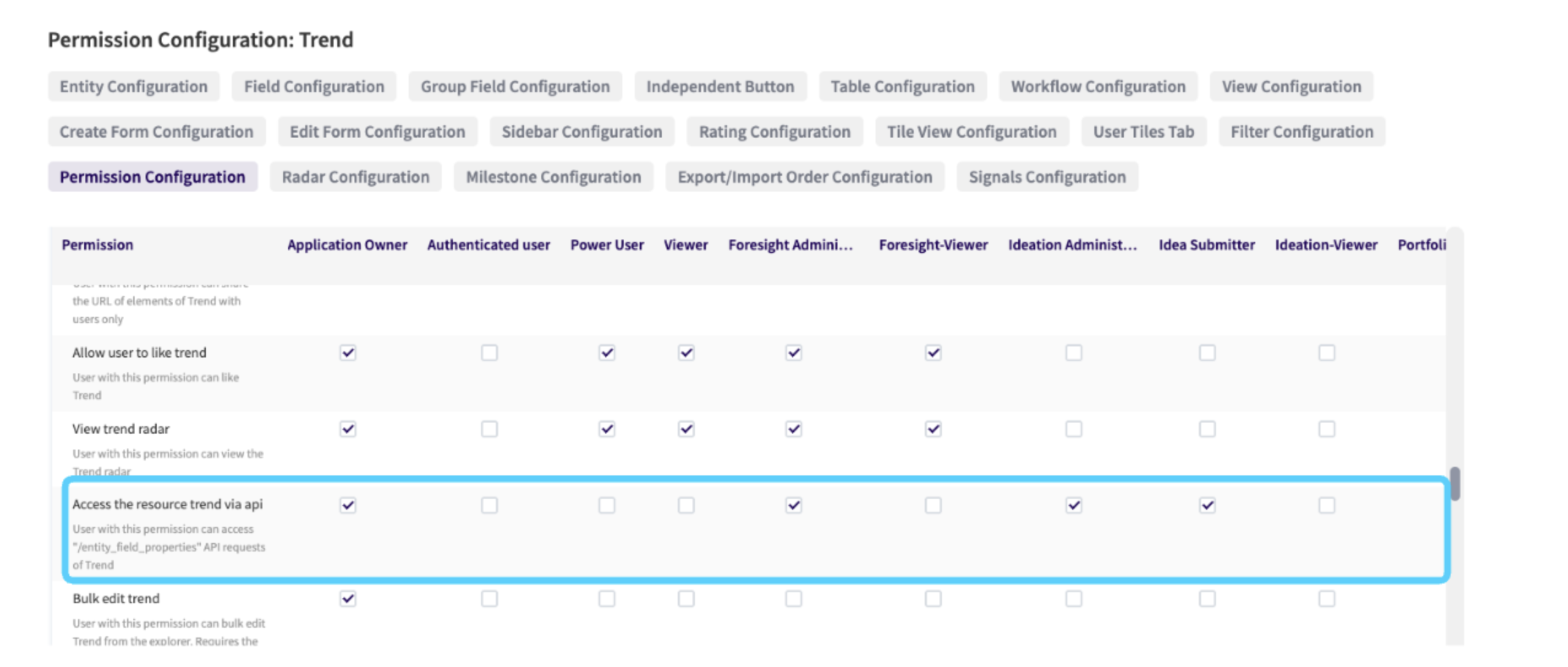
For authentication options (Basic Authentication and OAuth 2.0), refer to Authentication and authorization.
API methods
The ITONICS API supports all common methods (GET, POST, and PUT; DELETE operation currently excluded) and includes common meta controls for slicing and filtering your requested data sets.
All API requests follow this standardized URL pattern:
{API method} https://{system URL}/api/{actual endpoint}.json?{meta control 1}&{meta control 2}
This structure is used across all available endpoints, which are detailed in the endpoint articles for each request type: GET endpoints and POST and PUT requests.
Integration capabilities
This section provides a brief, high-level technical overview of the integration capabilities using the REST API and API webhook capabilities of the ITONICS Innovation OS (Enterprise) application with your client applications.
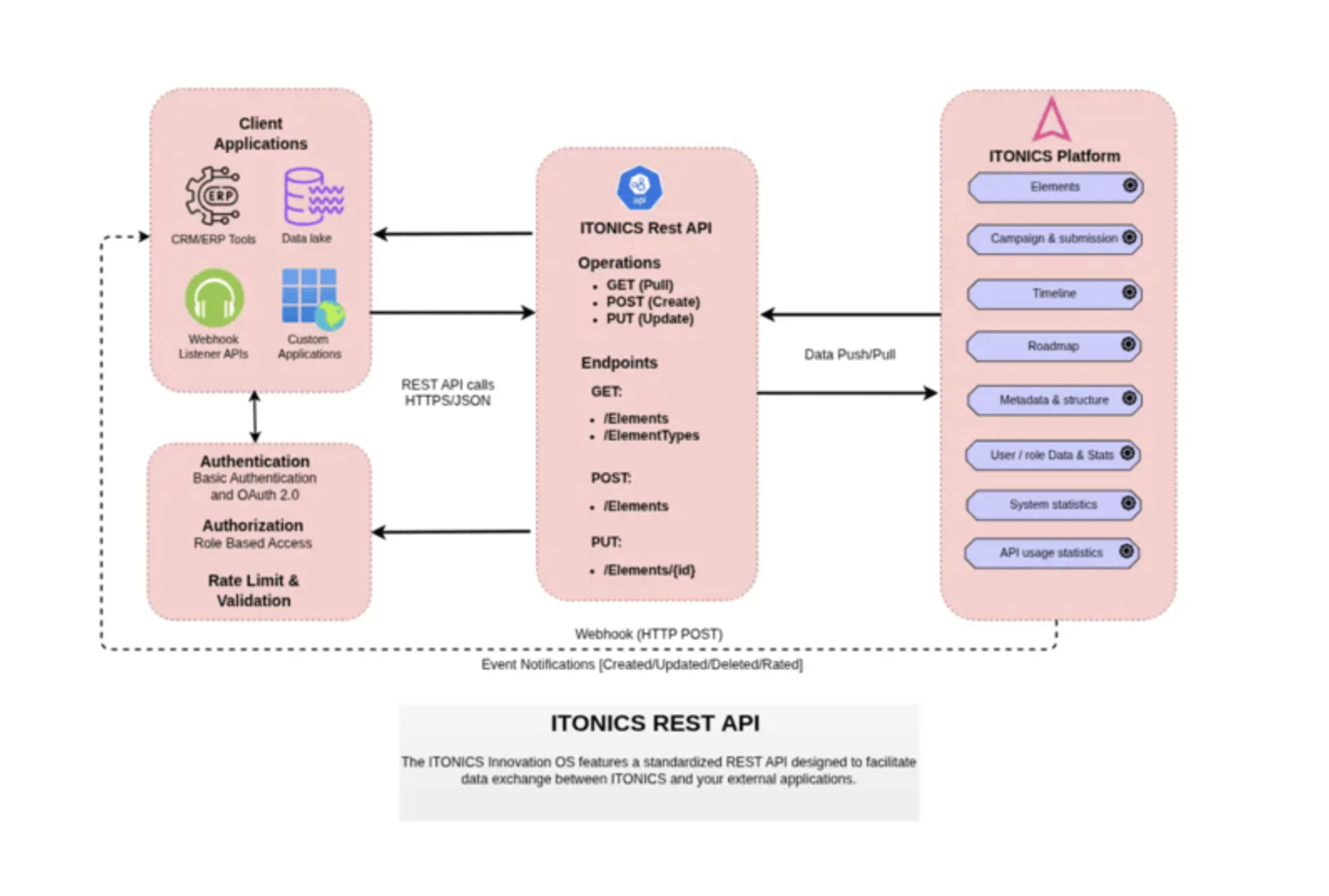
All internal systems (such as CRM/ERP tools, Data Lakes, or other internal platforms) integrate with the ITONICS Innovation OS using a common, standard integration approach.
Components of the architecture:
- Client applications: Represents your internal ecosystem, including CRM/ERP tools, Data Lakes, and Webhook Listener APIs.
- Security & validation layer: Acts as a gatekeeper, managing authentication (Basic or OAuth 2.0), authorization (Role-Based Access Control), and rate limiting/validation.
- ITONICS REST API ("gateway"): The central gateway supporting GET (pulling data), POST (creating elements), and PUT (updating elements).
- ITONICS platform (incl. data entities): The API provides access to core platform entities such as element data, campaigns and submissions, roadmaps, timeline/history data, metadata and element structure, and system statistics.
The integration architecture facilitates a secure flow of information between your client environment and the ITONICS Platform. Integrations may be inbound to ITONICS, outbound from ITONICS, or bi-directional, depending on the specific client use case.
Example use cases
This section provides potential and proven use cases demonstrating how you can leverage the REST API to solve common integration challenges.
1. Enhanced reporting via business intelligence (BI) tools
Use case: Your organization needs to analyze ITONICS data alongside external datasets (e.g., market data or financial performance) in a dedicated BI environment like Microsoft PowerBI, Tableau, or Qlik.
API utilization:
- The GET endpoints (e.g.,
/api/entity_stats/general_statistics.json) are used to continuously pull large volumes of data (elements, users, statistics) from ITONICS. - The BI tool can then perform dynamic analysis and create rich dashboards, ensuring your reporting is based on the latest ITONICS content.
Further details on connecting to PowerBI are covered in this dedicated article.
2. Real-time event-driven automations (API webhooks)
Use case: You need to trigger an immediate action in an external system (like a CRM, ticketing system, or communication platform) whenever a specific event occurs in ITONICS (e.g., an element status changes to "Published" or a new comment is added).
API utilization:
- API webhooks are configured within ITONICS to listen for specific events.
- When an event occurs, ITONICS sends an instantaneous HTTP POST request (the payload) to one or more predefined external endpoint URLs, enabling real-time communication.
- Use an automatic, subsequent GET request (e.g., via
/api/{entity_type}/{id}.jsonor/api/timeline.json?entity_type={entity_type}&entity_id={entity_id}) based on the "subscribed" webhook notification to understand the element's specific changes.
Further details on API webhook configuration are covered in this dedicated article.
3. Automated idea and content creation
Use case: An external client application (such as an internal LLM application, or data preparation service) may automatically create new idea submissions or elements in ITONICS without manual input.
API utilization:
- Preparation (GET): Before posting an idea, the external application uses the GET
/api/entity_field_properties.json?type=itonics_idea&camp_id={id}endpoint to retrieve the required field structure and validation rules for the submission entity type of the specific target campaign. - Creation (POST): The application then uses the POST
/api/itonics_idea.jsonendpoint to submit the new idea, ensuring the request body adheres to the required input format (including Title, Abstract, Authors, and a valid campaign_id). - Refinement (PUT): If the automation needs to update the idea content or adjust (default) fields after creation, it uses the PUT
/api/itonics_idea/{id}.jsonendpoint. This allows for continuous data synchronization and refinement after the initial creation.