
Important Notes
- Features marked with a star (*) have to be activated by ITONICS. For more information, please contact your Account- or Customer Success Manager.
- Please make sure to clear your browser cache once the update was processed, in order to avoid cache conflicts.
Take a look at the product update article to see the release highlights at a glance.
API
MCP Integration *
-
NUC-19286 – AI assistants and agents can now connect to ITONICS via the Model Context Protocol (MCP). Connected assistants can search and read elements, fields and metadata, create new elements as drafts and update existing ones, always within the permissions of the authenticated user. Teams can query and enrich their ITONICS content directly from the AI tools they already work in.
API
- NUC-18876 – The API now supports the OAuth2 Client Credentials grant for machine-to-machine authentication, allowing integrations to authenticate with a client ID and secret only, without transmitting user credentials. Credentials are bound to designated roles rather than individual user accounts, and write operations are attributed to a dedicated "API Automation" user. Application Owners can manage custom credentials as well as the default system clients under Settings > API Management > Credential Management, including creating, relabelling, rotating, enabling/disabling and revoking them. Every API request is logged with its client ID for traceability. Existing authentication methods are unaffected.
- NUC-19348 – Extended filter capabilities for the REST API. Elements, submissions and campaigns can now be filtered by additional field types, such as number, URL, email, segment and element search fields. The rating endpoint now supports filtering by rating average range and sorting by rating value or date, and the followers/likes endpoint can be sorted by number of followers or likes.
- NUC-19347 – Field selection for GET endpoints. The new fields_included and fields_excluded parameters let integrations retrieve only the fields they need for elements and users, keeping responses lean and faster to process.
Campaigns
Submission Field Configuration
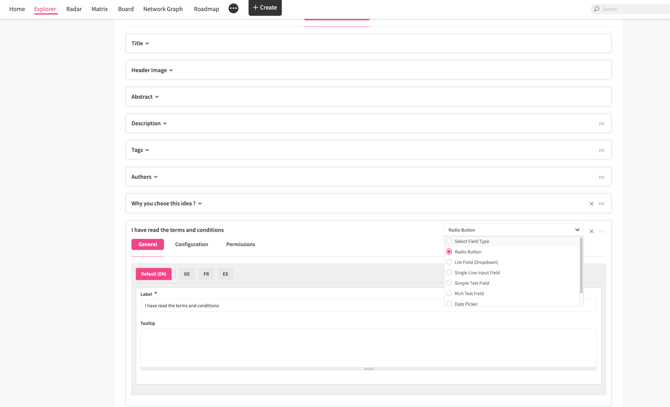
- NUC-13726 – The submission field configuration in Campaigns has been aligned with the Entity Configuration, giving Application Owners more flexibility when setting up submission forms. Field settings are now organized in consistent General, Configuration and Permissions tabs, using the same terminology as Entity Configuration (e.g., "Label" and "Is Mandatory?"). The submission User Search Field now supports options previously available only on entity fields, such as hybrid users, a maximum number of users, share permissions for selected campaign phases, and assignment and removal notifications. Single-line input fields now support Email, URL and Number validation, and Date fields can trigger reminder notifications to selected users.
Core
External Gateway
- NUC-18952 – Automated Mapped Fields in the External Gateway now support additional field types, including User Search and User Group Search fields, Location Search fields, Segment fields, Date Picker, Term Search and Element Search fields, as well as list fields using Radio Button, Single Checkbox and Pearl Chain renderers.
Application Owners can pre-assign values to all submissions received through a gateway.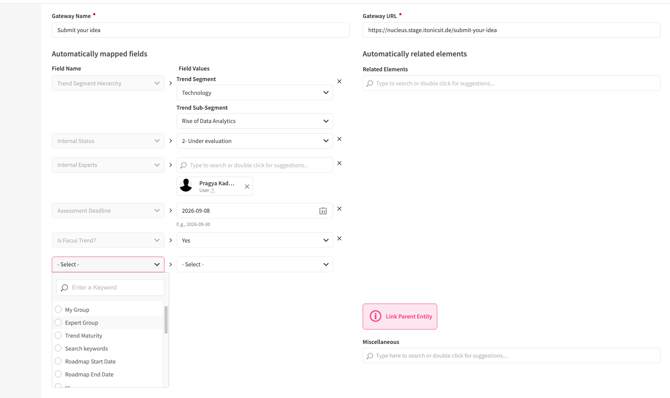
Permissions
- NUC-13723 – Excel and PDF export permissions have been moved from the global permission level to the entity-type level, enabling more granular control over who can export data for each entity type. Roles that currently hold the global export permission will automatically retain the equivalent entity-level permissions for all existing entity types. A global administrative override remains available for roles that require export access across all entity types.
Filters
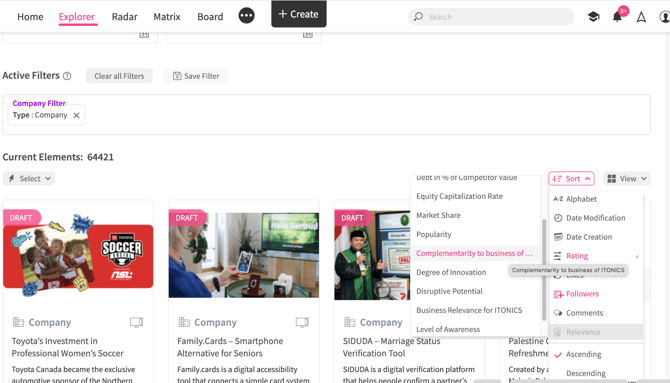
- NUC-18628 – A new Rating sort option has been added to the Sort menu. When a single entity type with configured ratings is selected, users can choose "Rating" and then a specific rating criterion, including aggregated ratings, to quickly identify the highest-rated elements. The option is also available in the Relations tab of the element detail page and on parent element child boards, for users with access to ratings for the entity type.
Insights*
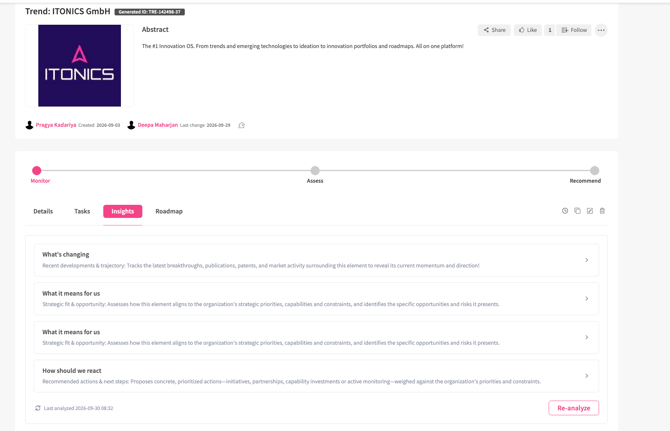
- NUC-18583 – The Signals tab on the element detail page has been replaced by Insights. Instead of a feed of individual news, publication and patent cards, users now see AI-generated summaries per perspective together with their sources, making it easier to grasp what matters without skimming long lists. Application Owners can define perspectives (title and instructions) per entity type and add a master context under the new Insights Configuration in Entity Configuration, which replaces the Signals Language Configuration. Three default perspectives are provided: "What's changing", "What it means for us" and "How we could respond". The third-party policy templates have been updated accordingly.
Note: On-premise installations need to whitelist the new external API endpoint on their firewall.
Notifications
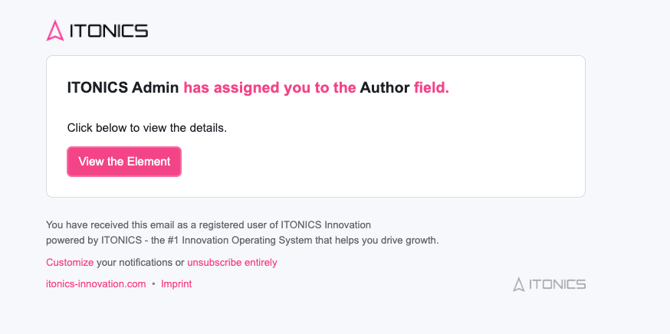
- NUC-17527 – The email notification template has been redesigned with a modern layout aligned with the ITONICS design system, while keeping your customer-specific branding. The new design applies to all notification emails sent by the platform.
Parent child
- NUC-18081 – Numeric values of child elements can now be aggregated into their parent element. Application Owners configure aggregation mappings in the Parent-Child configuration (Sum, Average, Min, Max or Count) from one or more numeric child fields. The result is stored in a system-managed calculated field on the parent and can be used in Explorer columns, calculated field formulas, visualizations (Matrix, Board KPI, Dashboard charts), the API, and Excel and PDF exports. This removes the need for manual calculation of totals such as costs.
Tables
- NUC-18260 – A new "Lock table for editing" option in the table configuration allows Application Owners to make a table read-only in the interface. Users can no longer add, edit or delete rows in locked tables, while data can still be written via the API and Excel import. This is useful for tables maintained by external systems. Locked tables are marked with a lock icon.
Integration
Integrations *
- NUC-19529 – Administrators can now upload a default image in the configuration of each third-party integration. It is automatically attached to imported records that have no image of their own.
Roadmap
Roadmap
- NUC-14739 – A new Roadmap Manager user search field on the roadmap create and edit form lets you grant selected users edit authority on one specific roadmap, without changing their role-level permissions. Roadmap Managers can edit roadmap settings, add, move and remove elements, manage connections and milestones, and create snapshots and scenarios. Users receive an email notification when they are assigned or removed. Roadmap Managers cannot delete the roadmap, and entity-level permissions on the elements remain unchanged.
- NUC-19301 – A new Roadmap Logs area in the Logs menu records every creation, edit and deletion of a roadmap, including who made the change and a before/after summary of the changed fields, such as Roadmap Manager assignments. The logs can also be retrieved via a new API endpoint. The area is visible when the Roadmap module is enabled.
- NUC-19214 – Administrators can now group roadmaps under menu groups in the Roadmap navigation via the new Roadmap Menu Configuration in System Administration > Roadmap Management. Groups support multi-language titles and custom ordering, making it easier to find the relevant roadmap when many exist.
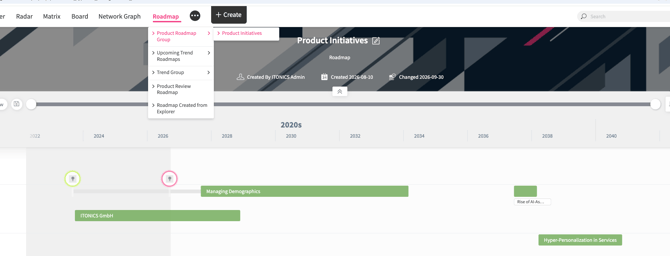
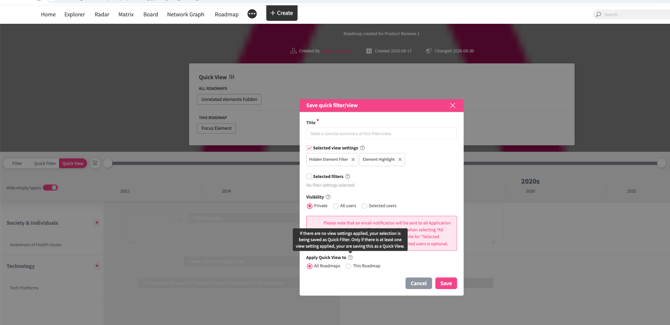
- NUC-19183 – When saving a Quick View, users can now choose whether it applies to This Roadmap or All Roadmaps. The Quick View panel shows the two groups separately, keeping it manageable for customers with many roadmaps.
3.26.1 (Released on 9th of October 2026)
API
- NUC-14802 - The Get user roles API now returns accurate user counts and no longer includes system roles in its response.
- NUC-18065 - Date filter parameters now behave consistently across API endpoints, with clear validation messages when a date range is invalid.
- NUC-18868 - Creating or updating a draft child element through the API now requires a parent element, matching the behavior of the interface.
- NUC-19707 - The elements API now returns a clear validation message instead of a server error when a filter receives an unsupported value type.
Campaigns
- NUC-14258 - The Convert button on campaign submissions is now hidden when the destination entity type is disabled or deleted.
- NUC-15429 - Anonymous users in campaigns are no longer clickable and no longer show a view profile option.
- NUC-14320 - Existing campaigns no longer have their campaign type changed when they are updated through campaign import.
- NUC-19339 - Campaigns created from a blueprint through Excel import now carry over the blueprint’s submission definition fields.
Core
- NUC-12198 - The gear icon menu on the Global Timeline now opens reliably without triggering a JavaScript error.
- NUC-12329 - Entering a To date earlier than the From date in the Global Timeline filter now adjusts it automatically instead of applying an invalid range.
- NUC-17520 - Header images reused across entity types, including from disabled entity types, now load correctly instead of causing errors or broken images.
- NUC-19514 - Pasting an image several times in quick succession into a rich text field no longer causes saving to fail.
Detail page
- NUC-11994 - The Assign / Manage Experts pop-up now displays users correctly after Find Relations has been opened beforehand.
- NUC-19990 - Recommended elements for Element Search Fields no longer cause an error when a selected target entity type is disabled.
- NUC-20028 - Posting a comment on an element that another user has just deleted no longer causes an error.
Entity Configuration
- NUC-12551 - Calculated fields are now also hidden from group field configurations, and a validation message appears when one is used in an enrichment trigger.
- NUC-13600 - Editing a segment field from the translation page now opens the correct configuration page, and Cancel returns users to where they came from.
- NUC-14891 - The Reminder dropdown in the date picker field configuration now displays its options at full width.
- NUC-19869 - Entity configuration export and merge now reliably carries over all settings, including aggregate rating labels and tables from newly enabled modules.
Export / Import
- NUC-13941 - Excel import and POST/PUT API requests now respect the maximum number of users configured on a User Search Field.
- NUC-15303 - Excel import and API requests now show a clear validation message when multiple users are submitted to a single-select User Search Field.
- NUC-19335 - File links in elements exported as PDF now open the attached file correctly instead of leading to a broken page.
- NUC-19954 - Application Owners can now export element comments, including replies, to Excel through a new comment export in the administration menu.
External gateway
- NUC-11890 - Validation messages for incomplete external gateway forms no longer reappear on other pages after navigating away.
Filters
- NUC-15270 - Removing an entity type from the active filter now also removes its related sub-filters, preventing unintended AND logic in the results.
Network graph
- NUC-19346 - Roadmap and Milestone entity types are no longer listed in the Network graph visualization.
Notifications
- NUC-15255 - Email templates used in workflows, external gateways, or date picker reminders can no longer be deactivated or deleted, and a message explains why.
- NUC-18093 - Four unused email templates have been removed from Email Templates and Email Actions to reduce confusion for application owners.
- NUC-18951 - Replying to a comment while mentioning the same user now sends a single mention notification instead of two separate emails.
- NUC-20034 - Typos and inconsistencies in the system default email templates have been corrected in all supported languages, leaving customized templates unchanged.
Parent child
- NUC-13008 - Unpublished child elements now correctly inherit the visibility of their parent element for users who are allowed to view them.
- NUC-20293 - Child elements in Draft or Review status can now be published directly from the detail page, matching the Edit page behavior.
Permissions
- NUC-17960 - The Grant Permission pop-up now lists individual tabs only when confidentiality is enabled, simplifying the available options.
- NUC-20346 - Approvers selected through user fields now receive notifications for permission requests, and requesting or granting permissions no longer fails on MSSQL systems.
Ratings
- NUC-11195 - Label and tooltip of rating criteria created from an aggregated rating are now saved for all available languages, not only English.
Roadmap
- NUC-15364 - Clicking a milestone connected to an element the user cannot view no longer triggers an error pop-up.
- NUC-19425 - Elements with identical start and end dates now render correctly in the Roadmap visualization, even when it is the only element.
- NUC-19781 - Copying an element that is part of a roadmap now correctly carries over its Roadmap details to the copy.
- NUC-20374 - The image field is now available again on the Roadmap create and edit page.
Trendone
- NUC-19962 - Trendone synchronization now writes detailed debug logs, enabled through a new Enable Debug option, to simplify troubleshooting missing updates.
UI/UX
- NUC-18480 - Table columns in the Mail logs list view are now aligned correctly, making log entries easier to read.
- NUC-18710 - Dropdowns in several pop-up forms are now aligned with their input fields for a cleaner appearance.
- NUC-19150 - The SSO configuration page now visually separates fields when value mapping rules are enabled, improving readability.
- NUC-19636 - Edit forms with many configured properties no longer cut off the bottom of the page.
- NUC-19830 - The Request Permissions dialog now displays its previously missing disabled input field and aligned tooltips.
User management
- NUC-11799 - Approving several user requests at once now shows a single, clearly worded success message instead of multiple messages.
- NUC-19633 - The mandatory profile information pop-up no longer appears on every page for service accounts and administrators.
Webhooks
- NUC-19860 - The API Webhook Configuration page now loads correctly, including SQS settings, on systems that do not use S3 file storage modules.
Workflow
- NUC-11660 - Clicking a workflow button no longer causes a JavaScript error for users with restricted comment permissions.
- NUC-11731 - Workflow action button forms now show a validation message when the Button Selection dropdown is left empty.
- NUC-14525 - Ratings deleted in a workflow pop-up are now cleared correctly after comment validation instead of reappearing.
- NUC-15047 - Converting an element with ratings and saving it as draft or sending it to review now shows a confirmation that ratings are not transferred.
- NUC-15573 - URL trigger buttons can no longer be selected as button dependencies, preventing dependent buttons that never become available.
- NUC-15869 - The “Change to blank value” checkbox is now hidden for the Allow Submissions field in Value Change workflow triggers.
- NUC-18950 - Removing a workflow phase option that elements still use now requires confirmation and moves affected elements to the first phase option.
- NUC-19107 - The comment field now appears at the bottom of workflow action button pop-ups that combine comment with other triggers.