
What is it?
Every request to the ITONICS REST API must be authenticated. This article covers the two available authentication types, Basic Authentication and OAuth 2.0, including the OAuth 2.0 grant types, how to manage credentials, and the two authorization modes that determine how permissions are evaluated.
This article is part of the ITONICS REST API series. For the overview, refer to Overview and getting started.
In this article
- Authentication and authorization
- Basic Authentication
- OAuth 2.0 authentication
- Managing OAuth 2.0 credentials
- API authorization modes
Authentication & authorization
The ITONICS Innovation OS application offers two authentication types for the REST API: Basic Authentication and OAuth 2.
By default, Basic Authentication is enabled when the API is set up. Only one method can be active at a time. If you require OAuth 2, ITONICS can switch the authentication type upon request.
Basic Authentication
All API endpoints require the use of SSL with TLS 1.2 or above to ensure a secure connection between the ITONICS API and a client application/automation. Authentication is performed using HTTP basic authentication headers.
Authentication setup
- Create a dedicated API User: You must create a new user specifically for API authentication. This username must start with 'restws'.
- Assign permissions: Ensure this user is assigned to a role that has the necessary permissions within the system to execute the required requests (e.g., "Access the resource
<entity type>"). - Authentication format: Use the following header format for authentication:
Authorization: Basic <base-64-encoded string of "username:password">
Handling writing requests (POST and PUT)
ITONICS uses cookie-based authentication for all writing requests (POST and PUT).
- GET requests do not require a token.
- Writing requests require an HTTP X-CSRF token in the header.
You can retrieve the token from the dedicated GET endpoint /restws/session/token.
| Method | Endpoint | Details | Sample request |
|---|---|---|---|
| GET | /restws/session/token (Basic authentication) |
Returns an authorization token (the X-CSRF token) required for all subsequent POST and PUT requests. | /restws/session/token |
The token must then be included in the header of your writing requests using this format: X-CSRF-Token: received_token.
The X-CSRF token is valid for 2,000,000 seconds (approximately 23 days), while the token's validity is tied to the user's session and will expire if the session times out (typically after about 55 hours of inactivity) or if the user logs out, requiring you to fetch a new token.
OAuth 2.0 authentication
OAuth 2.0 (Open Authorization) is a standard protocol that allows one application (or website) to securely access resources hosted by another application on behalf of a user. This standard provides consented access, meaning it restricts and defines exactly what actions the client application is authorized to perform on those resources.
OAuth 2.0 authorization flow
To begin the OAuth 2.0 process, the user must first possess the necessary login credentials, a valid Client ID, and a Client Secret, all of which are provided by ITONICS upfront.
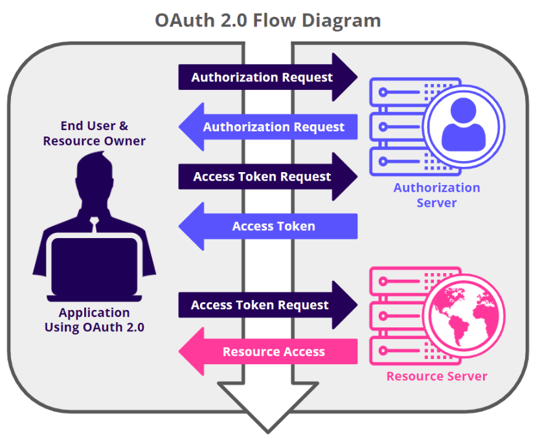
The authorization flow is initiated by the user, and the request, exchange, and response follow these general steps:
- The user requests authorization from the authorization server, using the Client ID and Client Secret for identification, and also providing the required scopes and an endpoint URI for access token delivery.
- The authorization server authenticates the user and verifies the requested scopes (Client ID and Client Secret) are permitted.
- The user interacts with the authorization server to explicitly grant access.
- The authorization server issues an access token to the user.
- Using the access token, the user requests access to the resource from the resource server.
Grant types
In the OAuth 2.0 authorization framework, grants refer to the specific set of steps a user performs to receive authorization for resource access. The ITONICS REST API utilizes the following grant types:
1. Password grant type
The password grant type exchanges a user's direct credentials for an access token. This flow is necessary to acquire the initial access token and the refresh token.
The token is retrieved from the POST endpoint /oauth2/token using the following required parameters:
| Key | Value | Explanation |
|---|---|---|
grant_type |
password |
Specifies the grant type for token retrieval |
client_id |
client_id |
The Client ID obtained from the OAuth 2 server configuration |
client_secret |
client_secret |
The Client Secret obtained from the OAuth 2 server configuration |
username |
username |
The ITONICS Innovation OS (Enterprise) application username |
password |
password |
The password for the ITONICS Innovation OS (Enterprise) application |
2. Refresh token grant type
The refresh token grant type allows a user to exchange an expired access token for a new, valid access token without requiring the user to re-authenticate with their username and password. You must execute the password grant type flow once to acquire the initial refresh token.
| Method | Endpoint | Details | Sample request |
|---|---|---|---|
| POST | /oauth2/token (OAuth2) |
Returns an access token required for all subsequent POST and PUT requests, and a refresh token to request a new access token if invalid. | /oauth2/token |
The new token is retrieved from this POST endpoint using the following required parameters:
| Key | Value | Explanation |
|---|---|---|
grant_type |
refresh_token |
Specifies the grant type for token renewal |
client_id |
client_id |
The Client ID obtained from the OAuth 2 server configuration |
client_secret |
client_secret |
The Client Secret obtained from the OAuth 2 server configuration |
refresh_token |
refresh_token |
The refresh token used to request a new access token |
The access token must then be used in the header of all requests for authorization: Authorization: Bearer access_token
Note: the tokens' lifetime, respectively the validity period, can be configured by ITONICS. Per default 3600 seconds (1h) for the access token, and 1,209,600 seconds (336h) for the refresh token.
3. Authorization code grant type
The authorization code grant type enables integrations that act on behalf of an individual user with the user's explicit consent, without the client application ever handling the user's credentials directly. This flow is recommended for third-party or user-facing applications.
The authorization flow follows these steps:
(1) The client application redirects the user to the authorization endpoint GET /oauth2/authorize, providing the following parameters:
| Key | Value | Description |
|---|---|---|
response_type |
code |
Specifies the authorization code flow |
client_id |
client_id |
The Client ID obtained from the OAuth 2 server configuration |
redirect_uri |
callback_url |
The registered redirect URI of the client application |
state |
random_state |
A random value to protect against cross-site request forgery |
(2) The user authenticates with the ITONICS application (if not already logged in) and is presented with a consent screen to approve or deny the requested access.
(3) Upon approval, the user is redirected to the registered redirect URI, with the single-use authorization code and the state value appended (callback_url?code=authorization_code&state=random_state).
(4) The client application exchanges the authorization code for an access token (and a refresh token) at the POST /oauth2/token endpoint:
| Key | Value | Description |
|---|---|---|
grant_type |
authorization_code |
Specifies the grant type for token retrieval |
code |
authorization_code |
The authorization code received via the redirect |
client_id |
client_id |
The Client ID obtained from the OAuth 2 server configuration |
client_secret |
client_secret |
The Client Secret obtained from the OAuth 2 server configuration |
redirect_uri |
callback_url |
The registered redirect URI used in the authorization request |
Expired access tokens are renewed via the refresh token grant type (refer to section 2).
Note: Authorization codes are single-use and expire after a short validity period; invalid, expired, or reused codes are rejected. The registered redirect URIs and the requested scopes are strictly validated.
Token revocation: When a user logs out or disconnects the client application, the granted access can be revoked via the POST /oauth2/revoke endpoint, providing the token, client_id, and client_secret. This allows users or administrators to invalidate an approved application's access at any time (consent withdrawal).
Note: To utilize the authorization code grant type, e.g. for the authentication via the MCP, a dedicated OAuth2 client (incl. the allowed redirect URIs and scopes) must be configured by ITONICS. Please contact your Customer Success Manager for further assistance. Existing OAuth 2.0 clients using the password or refresh token grant types remain unaffected.
4. Client credentials grant type
Note: The client credentials grant type will be available from version 3.26.0 (beginning of Q4 2026). This feature needs to be activated by ITONICS. Please contact your Customer Success Manager or Account Manager for further assistance.
The client credentials grant type is intended for machine-to-machine (M2M) integrations that act on their own behalf rather than on behalf of a user. No username or password is transmitted - the automation authenticates with a Client ID and Client Secret only, and the issued token carries the permissions of the roles bound to that credential.
The token is retrieved from the POST endpoint /oauth2/token using the following required parameters:
| Key | Value | Description |
|---|---|---|
grant_type |
client_credentials |
Specifies the grant type for token retrieval |
client_id |
client_id |
The Client ID of the credential binding created in Credential Management (see below) |
client_secret |
client_secret |
The Client Secret of the credential binding created in Credential Management (see below) |
The access token must then be used in the header of all requests for authorization: Authorization: Bearer access_token
A refresh token is issued alongside the access token; expired access tokens are renewed via the refresh token grant type described below.
Permissions are resolved from the roles bound to the credential at the time the token is issued. Where several roles are bound, the higher-privilege permission applies per overlapping permission. Note: No element-level permissions (visibility tab, user and user group search fields, granted permissions) are evaluated for client credentials tokens, as no user account is bound - this applies regardless of whether the RBAC-enforced API mode is active.
Write operations performed with a client credentials token are attributed to the global API Automation persona: created_by on POST and last_editor on PUT. The created_by value can still be overridden via the POST payload. The client_id is recorded in the audit log on every request, so each call remains traceable to a specific integration.
5. (Potential) Token retrieval error responses
When attempting to retrieve a token via the POST /oauth2/token endpoint, you may receive the following error responses.
Invalid client credentials
This error indicates an issue with the application's identification (Client ID or Client Secret).
| Key | Value | Description |
|---|---|---|
error |
"invalid_client" |
The credentials provided for the client application are incorrect. |
error_description |
"The client credentials are invalid" |
The Client ID or Client Secret supplied in the request is invalid or incorrect. |
Invalid user credentials
This error indicates a problem with the user's login details.
| Key | Value | Description |
|---|---|---|
error |
"invalid_grant" |
The credentials provided for the user authentication failed. |
error_description |
"Invalid username and password combination" |
The username or password supplied in the request is invalid. |
Managing OAuth 2.0 credentials
Note: Access to Credential Management requires the Administer OAuth2 API authentication permission. This interface will be available from version 3.26.0 (beginning of Q4 2026). This feature needs to be activated by ITONICS. Please contact your Customer Success Manager or Account Manager for further assistance.
The OAuth 2.0 clients used by the ITONICS REST API are maintained in the Credential Management interface. This includes the default clients that ship with the application, marked as System (Password and Authorization code grant types), and any Client ID and Client Secret pairs created for the client credentials grant type, marked as Custom, together with the roles bound to them. The list can be filtered by label, Client ID, client type, and status.
To create a credential:
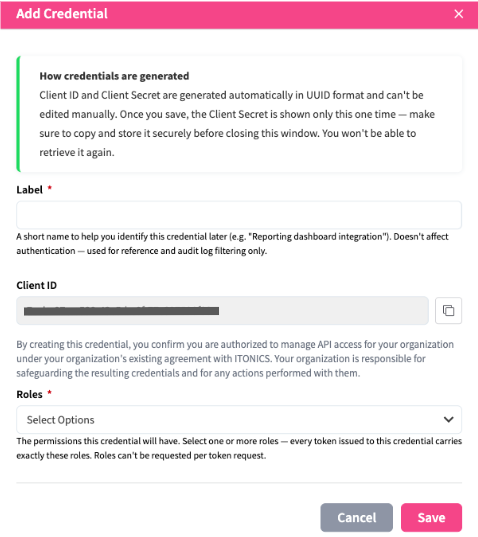
- Go to Settings Wheel > System Administration > API Management > Credential Management.
- Click Add Credential.
- Enter a Label to identify the credential. The label is used for reference and for filtering the audit log; it does not affect authentication.
- Select one or more Roles. At least one role is required - the credential's permissions are fixed to the selected roles.
- Click Save. The Client ID and Client Secret are generated automatically.
- Copy the Client Secret and store it securely. It is displayed once and cannot be retrieved afterwards.
Each credential supports the following actions (numbers refer to the icons in the screenshot):
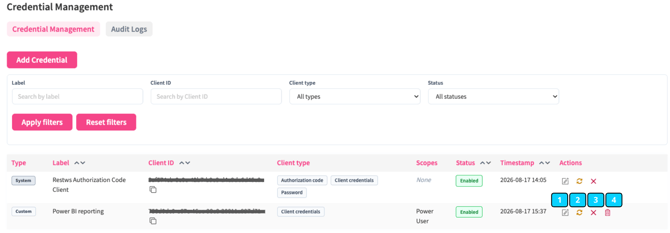
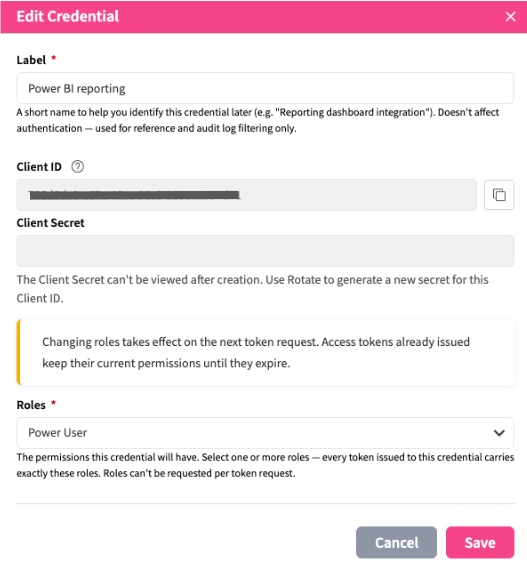
- Edit [1] - change the label and the bound roles. The Client ID and Secret cannot be changed. Role changes apply to the next token issued; tokens already issued keep their permissions until they expire.
- Rotate secret [2] - generate a new Client Secret and invalidate the current one immediately. The new secret is displayed once, and the Client ID remains unchanged (to maintain traceability in logs; create a new credential pair for a new Client ID).
- Disable / Enable [3] - block or restore token requests and refresh exchanges. Access tokens already issued remain valid until they expire. Reversible at any time.
- Revoke [4] - permanently retire the credential and invalidate all active access tokens. The record and its audit history are preserved ("silent delete").
The default system clients can be relabelled (only affecting the display in the Credential Management and the Audit logs), their secret rotated, and disabled or re-enabled, each with an additional confirmation step. Revoke is not available for these clients. They authenticate a real user, so permissions are carried from that user's own respective role-scoped permissions (refer to Password and/or Authorization Code grant type).
Credential changes – creation, re-label, role change, rotation, disable/enable, and revoke – are recorded under Audit Logs, tracking the action, the user who performed it, its timestamp, and what changed. Important note: Client secrets are not stored in the log.
API authorization modes
The ITONICS REST API supports two distinct authorization modes that determine how permissions are evaluated for API requests.
Legacy API permission mode (default)
API access is controlled via the dedicated API-level permissions listed throughout the endpoint articles (e.g., "Access the resource <entity type> via API"). Application-level permissions are not consistently evaluated during API requests, meaning an API user may be granted broader access for automation purposes than their role provides within the application. This is the default mode, and the behavior of existing integrations remains unchanged.
RBAC-enforced API mode (opt-in)
In addition to the API-level permissions, the application-level permissions of the requesting user are evaluated for every API request. Application-level permissions always take precedence: API access can never exceed the access a user has within the application itself (e.g., a user without the permission to view an entity type in the application cannot retrieve elements of that entity type via GET requests). This mode establishes strict permission parity between the application and the API, and is recommended for use cases with strict confidentiality requirements — for example, integrations or LLM-based applications retrieving or creating data on behalf of individual users.
Note: The RBAC-enforced API mode must be activated by ITONICS. If you are interested in enabling this mode for your system, please contact your Customer Success Manager.
⚠️ Please be aware: Activating the RBAC-enforced API mode can affect existing integrations if the utilized API users do not hold the corresponding application-level permissions. ITONICS strongly recommends reviewing the permissions of all API users and testing existing integrations in a non-production (STAGE) environment before activating the mode.
Note: The required permissions listed in the endpoint tables of the GET endpoints and POST and PUT requests articles describe the default (legacy) authorization mode. If the RBAC-enforced API mode is activated for your system, the respective application-level permissions (e.g., view/edit permissions for the requested entity type) are additionally required.