
What is it?
This article covers the practical side of working with the ITONICS REST API: base64 header image uploads, recommended testing, the known limitations that apply to API usage, and the HTTP status codes you may encounter.
This article is part of the ITONICS REST API series. For the overview, refer to Overview and getting started.
This article covers critical information, limitations, and key best practices to help you manage successful and reliable integrations with the ITONICS REST API.
In this article
- Image header file upload with base64 encoding
- Testing & limitations
- Status codes
Image header file upload with base64 encoding
Due to security constraints, the ITONICS REST API cannot directly use relative URLs for images. To enable image functionality via the API, a specific module must be activated by ITONICS.
Enabling image uploads
To enable the header image upload feature, the module RESTful web services support for files and images (restws_file) must be activated by your ITONICS Customer Success Manager.
Upload method (POST/PUT):
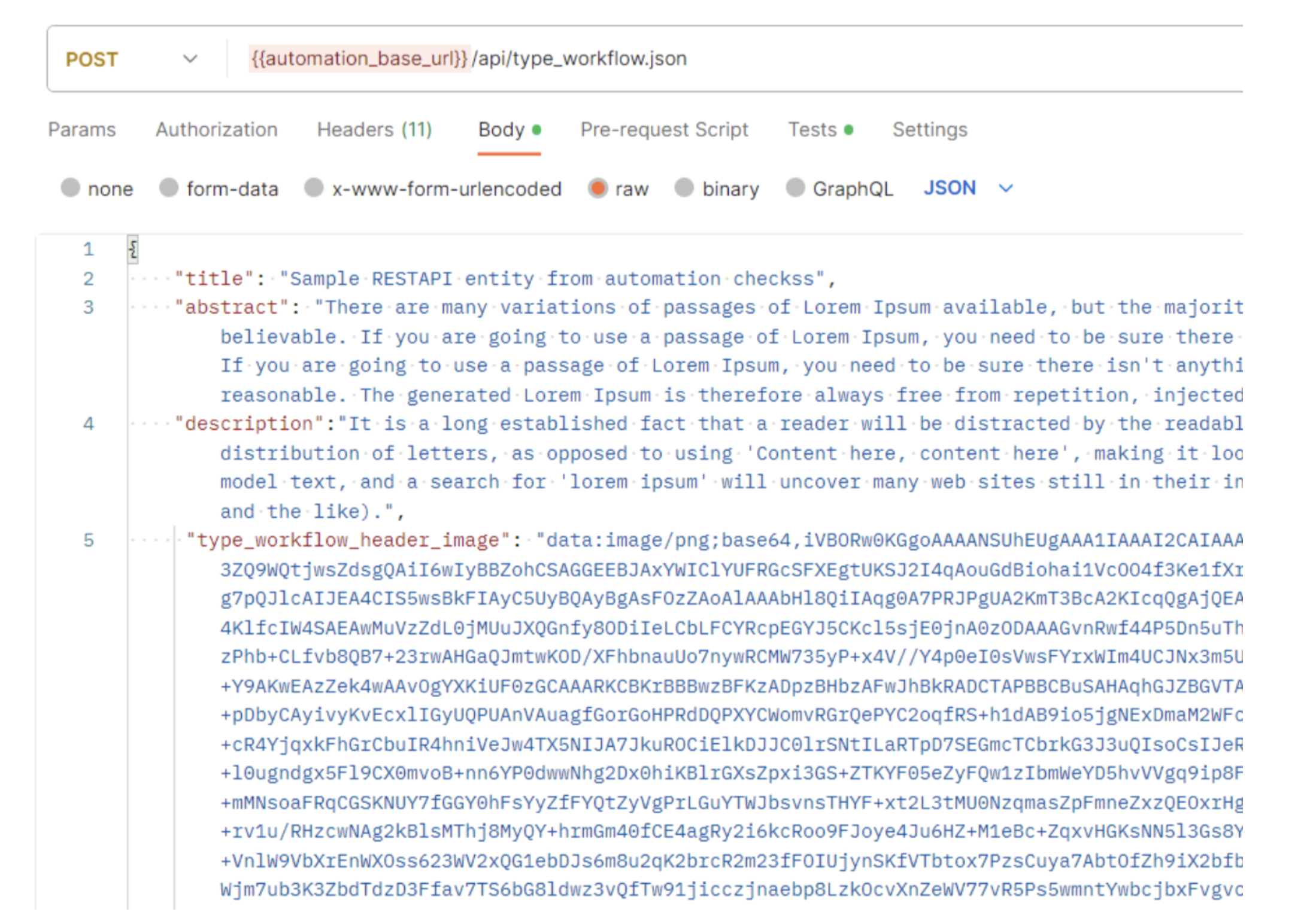
- Images must be base64 encoded for API requests, as the API accepts JSON data, not binary files. You can use an online tool (e.g., https://www.base64-image.de/) to generate the required string.
- The base64 encoded image is converted back to a normal image and stored in the ITONICS application's private folder.
Retrieving header images (GET)
When you use a GET request to retrieve entity details along with the uploaded header image (e.g. /api/itonics_trend/42.json), the header image can be returned either as a relative URL or as a base64 encoded image with the API configuration, which can be adjusted by ITONICS upon request.
Default (relative URL):
- By default, the API returns a relative URL
- This URL cannot be opened without logging into the application, as the image is stored in a private, secured folder
External use (base64 encoding):
If you need to use the header image externally in third-party applications, the API must be configured to return the base64 encoded image / string. This must be configured by your ITONICS Customer Success Manager. Further, the option convert header images to base64 must be set to yes. This ensures the header image is returned as a Base64 encoded string, allowing it to be displayed externally. Refer to the following sample request for a header image with base64 encoding:
Testing & limitations
How to test the REST API?
We recommend using one of the following API testing tools to validate your integration:
- Postman rest client (Desktop version)
- Talend API Tester
- Advanced Rest Client (ARC)
After completing the system setup, use the described endpoints to test all common scenarios, including:
- Authentication: Generating and utilizing the required authentication token (e.g., X-CSRF or Access Token) - refer to Authentication and authorization
- Basic CRUD operations:
- GET requests: Verifying the functionality of meta controls, including limiting, pagination, sorting, and querying - refer to GET meta controls and filter options
- POST and PUT requests: Testing fundamental requests to create and manipulate data using both mandatory fields and all available fields - refer to POST and PUT requests
- Negative testing: Testing with invalid/missing field values, missing tags, and incorrect data combinations for dependent fields to confirm expected error handling, including HTTP status codes with correct response bodies
Note: ITONICS emphasizes the importance of performing all initial testing in a non-production (STAGE) environment to prevent data corruption.
Limitations
The following constraints and limitations apply to the ITONICS REST API usage:
Usage quotas:
- The API enforces a monthly quota for total requests; while the default quota is 100 requests per month
- Statistics regarding your monthly API usage can be found under the URL
/manage/api - Each request is, by default, limited to 100 results per page (pagination limit)
- Potential error response if quota is exceeded: 406 Not Acceptable - Maximum API request reached for this month, please contact the administrator, or your ITONICS Customer Success Manager.
Attribute validation:
- The default Title field has a maximum length limit of 255 characters
- Date formats are generally expected in the YYYY-MM-DD format for POST / PUT requests
- Date picker fields with a configured date range accept values across the full configured year(s), from YYYY-01-01 to YYYY-12-31
- User search fields require the respective user's username for input
- Single-select user search fields accept one username only; passing multiple values returns a 422 Unprocessable Entity
- Multi-select user search fields enforce the maximum number of users configured on the field; exceeding it returns a 422 Unprocessable Entity
- Number fields are generally validated using the XXXX.YY format (e.g., 1024.56)
- URL fields are generally validated to ensure a valid URL pattern
- Email fields are generally validated to ensure a standard, valid email format
- Added element relations require a valid element ID
Further known limitations
- There is no POST / PUT request available for the campaign entity type (type
itonics_campaign_tr3) - There is no POST / PUT request available for the corresponding
/api/user.jsonGET request, and no POST request for roadmaps (roadmap configuration cannot be created via API) - Filtering on rich text and simple text content is supported for the default Description and Abstract fields only; custom rich text editor and simple text fields cannot be used as filter parameters.
Status codes
When using and testing the API, you must check the returned HTTP status code, the response message, and the response body to verify success or diagnose errors. Below is a list of common HTTP status codes you may encounter while using and testing the API:
| HTTP status code | Response | Details |
|---|---|---|
| 200 | 200 OK | The request (typically a GET or PUT) was processed successfully, and a response was generated. |
| 201 | 201 Created | The request (typically a POST/Create) has been fulfilled and has resulted in one or more new resources being created successfully. |
| 400 | 400 Bad Request | The server could not process the request, likely due to a malformed request syntax, missing required data, or addressing the wrong endpoint, e.g. missing '{}' brackets or a non base64 encoded file data, which would be indicated by "Invalid JSON". |
| 401 | 401 Unauthorized | The request requires user authentication. This is often returned if the user is not authenticated (e.g., missing or invalid token/Basic Auth). |
| 403 | 403 Forbidden / Restricted | The request was valid and understood, but the server is refusing action. This usually means the API user lacks the necessary permissions for the resource, is blocked, or is attempting a prohibited action (e.g., creating a duplicate unique record). This code is also typically used if the request provided authentication via the WWW-Authenticate header field, but the server did not accept that authentication. The request should not be repeated. |
| 404 | 404 Not Found | The requested resource (via ID or endpoint URL) could not be found, but may be available via a future request. Subsequent requests by the client are permissible. |
| 405 | 405 Method Not Allowed | The method (i.e. DELETE, PATCH, HEAD, and OPTIONS) utilized in the request is not allowed, only GET, POST, and PUT are supported. |
| 406 | 406 Not Acceptable | The requested resource can only generate content types that do not match the Accept headers sent in the request. |
| 412 | 412 Precondition Failed | The server does not meet one of the conditions specified by the client in the request header fields. This code is also returned where a request contains a filter parameter that is not recognised for the endpoint. |
| 422 | 422 Unprocessable Entity | The request was well-formed but could not be processed due to semantic errors (e.g., invalid data types, non-existent entity references, and/or missing mandatory fields). |
| 500 | 500 Internal Server Error | A generic error indicating an unexpected condition was encountered on the server, and no more specific message is suitable. |