
Who can use this feature?
Only the Application Owner role can use this feature.
What is it?
By default, access to the Entity Configuration is governed by a single global backend permission — Administer full entity configuration — which grants the assigned role complete administrative rights across all entity types in the system. This model assumes that one or a small number of central Application Owners are responsible for managing the entire platform configuration, and remains the default behaviour.
However, for organisations with more complex or distributed structures, it may be necessary to delegate the configuration of specific entity types to dedicated roles — without granting them full, platform-wide administrative access. The granular Entity Configuration permissions make this possible by introducing entity-type specific permissions alongside the existing global administer permission.
This allows you to assign configuration rights at the entity type level, enabling different roles or teams to independently manage the entity types they are responsible for, while the Application Owner retains full governance over the overall platform configuration. This is particularly useful for larger organisations looking to scale platform administration across teams or isolated use cases without creating dependency on a single centralised owner.
Important note: The Application Owner role always retains full administrative access to all entity types, regardless of how these permissions are configured.
How does it work?
Configuring the permissions
Navigate to Settings > Entity Configuration > Entity Configuration and click the Permission Configuration tab. Select the Entity Configuration Permissions sub-tab.
Here you will find two types of permission:
- Administer full entity configuration — grants a role complete administrative access to all entity types, including all global configuration sections. Assigning this permission preserves the existing behaviour.
- Administer <entity:type> entity configuration — one permission entry is listed per entity type configured in your system (e.g. Administer Trend entity configuration). Granting this to a role gives it full configuration rights for that specific entity type only.
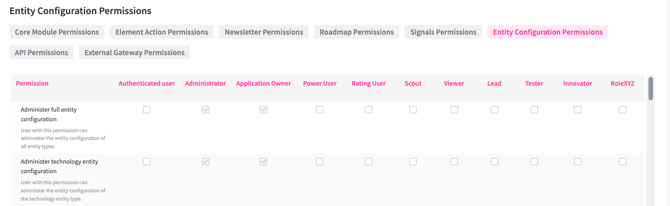
Check or uncheck the boxes in the permission table to assign these permissions to the relevant roles, in the same way as any other permission in the system. Hit Save permissions to apply the changes immediately.
Important note: To grant entity-specific configuration rights, a dedicated role must be created and assigned to the relevant users. Adopting this setup therefore increases the number of roles to be maintained in your system.
Access for entity-specific configuration roles
A role assigned an Administer <entity:type> entity configuration permission receives full configuration rights for that entity type. This includes all configuration tabs available for the entity — such as Field Configuration, Workflow Configuration, Rating Configuration, Permission Configuration, and all other module-specific configuration tabs. The role can also configure Parent/Child setups, workflows, and entity conversions for its assigned entity type.
- In the Entity Manager, the role will see all entity types listed, but those it does not have permission to administer are displayed as disabled.
- A role can be assigned permissions for more than one entity type. In that case, only the entity types for which no permission has been granted will appear as disabled.
- If a role has no Entity Configuration permission assigned at all — neither global nor entity-specific — the Entity Configuration section is hidden from the Settings navigation entirely.
Segment Fields access
Roles with entity-specific permissions can access the Segment Fields configuration page. However, since segment fields can be shared across multiple entity types, the following restrictions apply:
- The role can configure the title, mandatory status, and multi-select setting for the entity types it is permitted to administer.
- The segment name and hierarchy depth cannot be edited. These fields are disabled, as changes to them affect the segment field across all entity types it is used in. Hovering over a disabled field displays an explanation of why it is unavailable.
What entity-specific roles cannot access
A role with only entity-specific permissions does not have access to:
- The global Field Manager
- The global Role Configuration
- The global Landing Page Configuration
- The global Permission Configuration
- Creating new entity types
- Editing the Master Context in the Insights Configuration
Note: Dashboard configuration, Landing Page configuration, Explorer menu configuration, and Campaign management settings each have their own separate permissions and are not part of the Entity Configuration permission scope. These are not affected by the granular Entity Configuration permissions.
Important note: Roles with entity-specific configuration permissions cannot grant themselves access to additional entity types. The sub-tab where Entity Configuration admin rights are assigned is part of the global Permission Configuration, which is only accessible to roles holding the Administer full entity configuration permission or the Application Owner. Entity-specific roles cannot navigate to or modify this page, so the permission boundary is enforced by the system and cannot be bypassed.
Creating new entity types
Only roles with the Administer full entity configuration permission can create new entity types. This ensures controlled governance over the introduction of new entities into the system.
Once a new entity type has been created, its corresponding Administer <entity:type> entity configuration permission is automatically generated and appears in the Entity Configuration Permissions sub-tab, ready to be assigned to the relevant roles.
Please also note that besides this decentralized permission schema, the ITONICS system also offers options for local permissions, e.g., permissions that can be granted just to specific users or content elements.
|
Global role and permission controls > System- and entity-level |
Local permission controls > Content element- and user-specific |